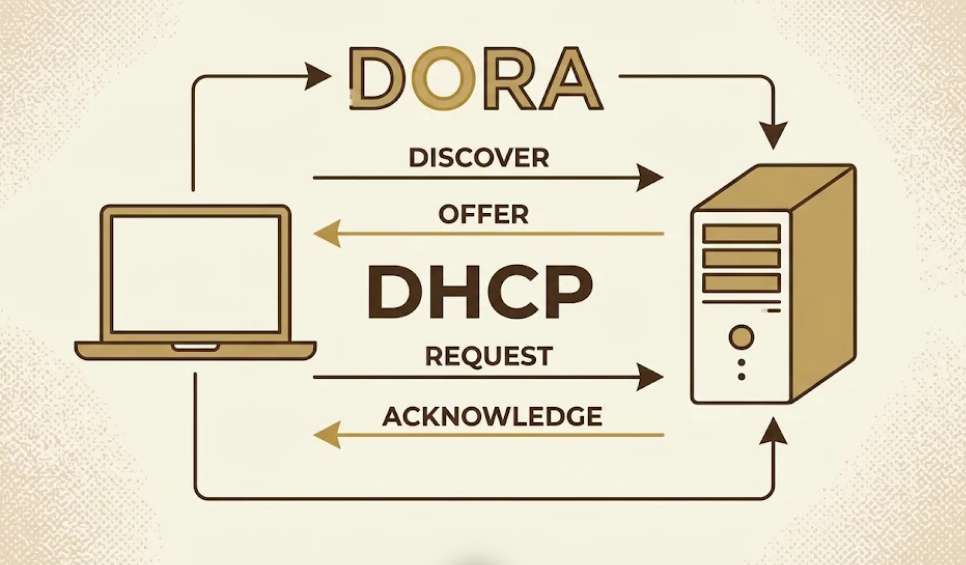
How DHCP Works: The DORA Process
Dynamic Host Configuration Protocol (DHCP) automatically assigns IP addresses and network parameters to devices when they join a network.
Without DHCP, administrators would have to manually configure an IP address, subnet mask, default gateway, and DNS server for every single laptop, phone, and server on the network.
Why Networks Rely on DHCP
DHCP operates on a client-server architecture. When a device connects via Wi-Fi or Ethernet, it doesn’t immediately know its network position. DHCP solves this problem dynamically by assigning temporary or permanent addresses from a managed pool of available IP addresses.
This automation eliminates IP address conflicts, reclaims unused addresses when devices disconnect, and simplifies administrative overhead across small homes and enterprise environments alike.
The Four Steps: D-O-R-A
1. Discover (DHCPDISCOVER)
Client Broadcast
When a client boots up or connects to a network, it has no IP address. It broadcasts a DHCPDISCOVER packet to the entire local subnet (destination 255.255.255.255) asking, “Is there a DHCP server on this network?”
2. Offer (DHCPOFFER)
Server Unicast / Broadcast
Upon receiving the discovery packet, the DHCP server reserves an available IP address from its address pool and responds with a DHCPOFFER message. This packet contains an offered IP address, subnet mask, default gateway, and lease duration.
3. Request (DHCPREQUEST)
Client Broadcast
If multiple DHCP servers send offers, the client picks one (usually the first received) and broadcasts a DHCPREQUEST packet. This tells the chosen server “I accept your offer” while letting other DHCP servers know their offers were declined so they can unreserve those IP addresses.
4. Acknowledge (DHCPACK)
Server Unicast
The DHCP server receives the request, finalizes the address lease in its database, and returns a DHCPACK (Acknowledgment) packet to the client. The client receives the configuration and can now actively transmit network traffic.
Key Configuration Options Handed Out by DHCP
IP Address & Subnet Mask
Identifies the device’s host identity and defines the network boundary for local broadcast domain boundaries.
Default Gateway
Specifies the local router IP address responsible for forwarding traffic off the local subnet to foreign networks or the internet.
DNS Servers & Lease Time
Provides domain name resolution server addresses and defines how long the client owns the assigned IP before needing to renew.
Quick Summary Mnemonic
Remember the 4-step sequence using DORA:
Discover → Offer → Request → Acknowledge